
Web Apps for Meta Ray-Ban Display: why HTML, CSS, and JavaScript require a different interface model
When Meta introduced Web Apps for Meta Ray-Ban Display, many developers assumed that building applications for smart glasses would be similar to creating a small web or mobile interface. The assumption sounds reasonable: the technology stack remains familiar, and developers can continue working with HTML, CSS, and JavaScript.
In practice, however, the familiarity ends with the technology itself. Web Apps for Meta Ray-Ban Display operate in an environment without scrolling, a mouse, a traditional keyboard, or a conventional screen. Developers must design for a fixed viewport, an additive display, and a focus-based interaction model that differs significantly from standard web experiences.
For this reason, Web Apps should not be viewed as miniature websites running on glasses. They represent a distinct interface platform with its own design principles and constraints.
Two Development paths for Meta Ray-Ban Display
Meta currently provides two primary approaches to building applications for display glasses.
The first option is the Wearables Device Access Toolkit, a native SDK for iOS and Android that extends an existing mobile application to the glasses display while providing access to device capabilities such as the camera and audio.
The second option is Web Apps. These are standalone applications built with HTML, CSS, and JavaScript that are delivered to the glasses through a URL. This approach is well suited for lightweight utilities, information overlays, rapid prototypes, and short contextual workflows.
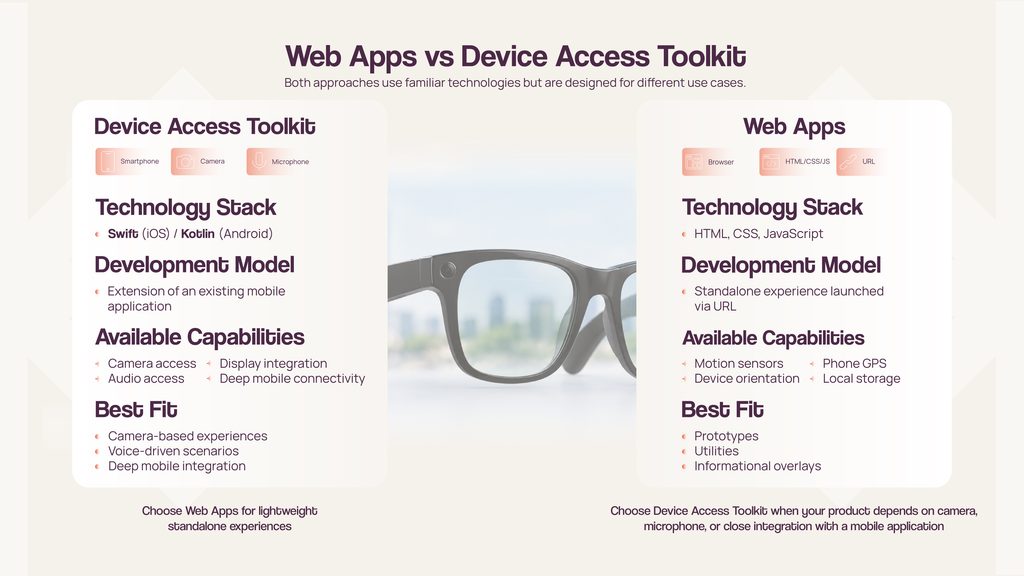
The distinction between these approaches is not primarily about programming languages. Device Access Toolkit extends a mobile application experience, while Web Apps are designed as independent micro-experiences.
If a product requires camera access, microphone functionality, or deep mobile integration, that decision should be made before interface design begins. For many other use cases, Web Apps provide a faster and more flexible path to deployment.
An important platform limitation is that Web Apps do not currently provide direct access to the glasses camera or microphone. If image capture, audio processing, voice recording, or other device-level capabilities are core requirements, the application must be built using Wearables Device Access Toolkit rather than Web Apps.
Three Principles that shape the entire experience
Most platform constraints can be traced back to three fundamental characteristics:
- a fixed 600×600 viewport;
- an additive display that overlays information onto the real world;
- a focus-driven interaction model rather than a cursor-based one.
Understanding these principles makes the rest of the platform feel less like a collection of isolated limitations and more like a coherent design system.
A 600×600 Display and no infinite scrolling
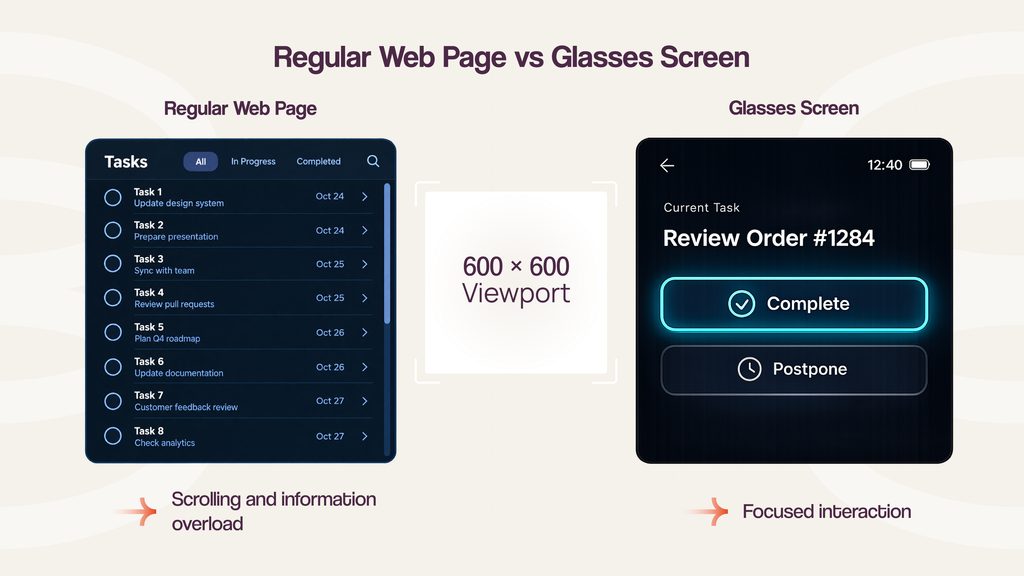
Every interface must fit within a 600×600 viewport without scrolling. For web developers, this changes the structure of an application from the ground up. Traditional web experiences often rely on long pages, large lists, dashboards, and expandable sections. On display glasses, these patterns quickly become impractical.
Instead of designing a page that users continuously scroll through, developers need to create a sequence of focused screens connected by predictable navigation. In most cases, a screen should present a single task, essential context, and only a small number of actions.
This limitation affects application architecture as much as visual design. Traditional patterns such as long task lists, data-heavy dashboards, multi-column layouts, and scroll-driven workflows often need to be redesigned as a sequence of focused screens connected by simple navigation paths.
The screen size, however, is only one part of the equation. Equally important is the display technology itself.
The Display adds light instead of covering reality
Meta Ray-Ban Display functions as a waveguide overlay that adds light to the user’s view of the real world. Unlike a smartphone or laptop screen, it does not replace the surrounding environment with an opaque interface. This behavior changes many familiar design assumptions.
Pure black pixels become effectively transparent because they emit no light. Bright colors are more visible because they actively add light to the scene. Large white surfaces can create excessive brightness and reduce readability.
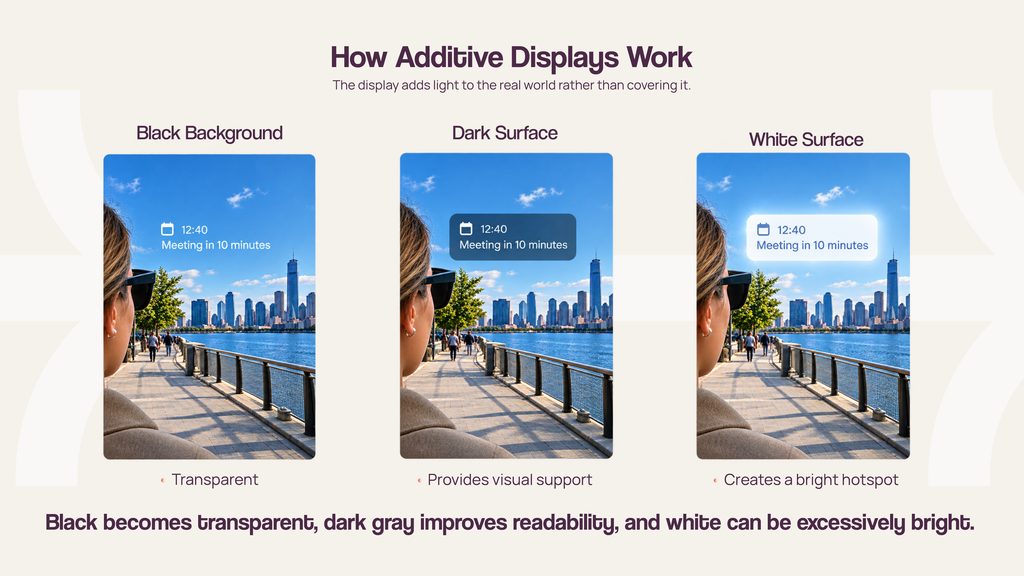
As a result, dark-themed interfaces become the natural default. Black backgrounds preserve visibility of the physical environment, while brighter elements are reserved for content, focus indicators, and key actions. For visual containers such as cards and panels, very dark gray often works better than pure black because it helps separate interface elements from the real-world background.
Typography also requires a different approach compared to standard web applications. To maintain readability across different lighting conditions, body text should generally remain at least 16px, while primary content is often more comfortable at 20-24px with strong contrast between text and background.
The display model also directly affects how users interact with applications. Another platform-specific consideration is icon rendering. Web Apps support PNG assets and Unicode symbols for launcher icons, while SVG icons are not currently supported by the platform.
Focus replaces the cursor
Web Apps for Meta Ray-Ban Display do not rely on a mouse pointer or touchscreen interaction.
Users navigate through the interface using the glasses controls and Meta Neural Band. Meta Neural Band translates hand and finger movements into standard browser events. Swipe gestures are converted into directional navigation events such as ArrowUp, ArrowDown, ArrowLeft, and ArrowRight, while a pinch gesture is interpreted similarly to pressing Enter on the currently focused element.
This creates one of the most important differences from traditional web development. A pinch should not be treated as a click at a specific coordinate. Users do not select a location on the screen. Instead, they activate whatever element is currently focused.
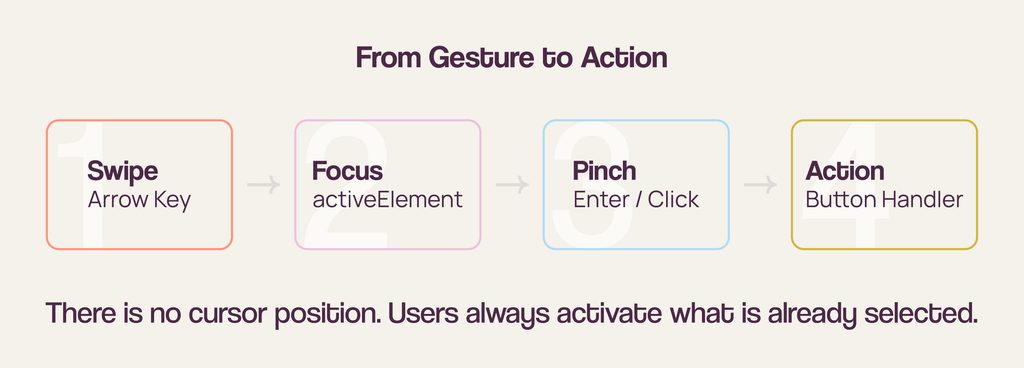
Because of this, focus management becomes a central design requirement. Predictable focus order and visible focus indicators become critical usability requirements. Every interactive element must be reachable through navigation, and the active focus state must always remain visible and predictable. Without a clear focus indicator, users may struggle to understand what action will be triggered next.
In practice, this means relying on native interactive elements such as <button> and <a> whenever possible, using tabindex=”0″ only for genuinely interactive custom components, and handling standard click events rather than introducing a separate activation model for gestures. A useful validation step is to navigate the entire application using only arrow keys and Enter in a desktop browser. If the experience remains clear and predictable, it is much more likely to work well on Meta Ray-Ban Display.
The platform also supports continuous pinch-and-drag interaction. However, this mode must be enabled explicitly and is best reserved for scenarios that genuinely require continuous control, such as maps, sliders, drawing tools, or games. For most applications, focus-based navigation remains the simpler and more reliable interaction model.
Composer replaces the traditional keyboard
Text input follows a very different pattern compared to mobile or desktop applications. Instead of opening a conventional on-screen keyboard, the system launches Composer when a user focuses on an input field and performs a pinch gesture. Composer supports voice input and, in supported regions, handwriting input, while the resulting text is delivered through standard web events such as input and change.
Composer, however, comes with several important limitations. It does not support password fields and certain other input types, ignores attributes such as inputmode and enterkeyhint, and can only be launched through a genuine user interaction. A simple programmatic focus call is not sufficient to open Composer.
These constraints have direct product implications. Traditional email-and-password authentication is often a poor fit for Web Apps, both because password fields are unsupported and because text entry follows a different interaction model. As a result, companion mobile apps, pairing codes, magic links, and other alternative authentication methods typically provide a better user experience.
Navigation and Device Capabilities
Platform constraints extend beyond interface controls.
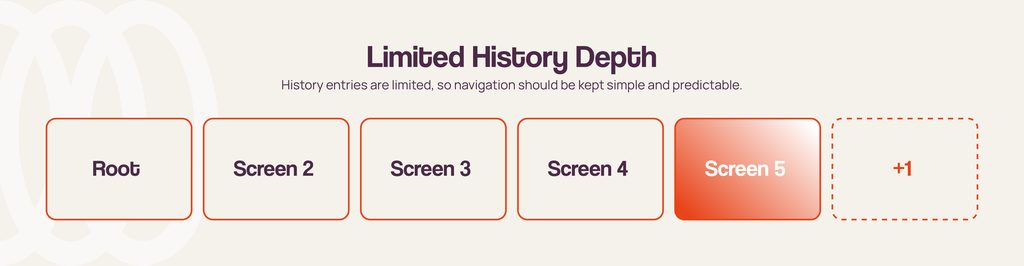
In Web Apps, browser history is closely tied to the system back navigation and is limited to five entries, including the initial document. This encourages shallow application structures with fewer navigation levels, more predictable user flows, and discourages deeply nested workflows commonly found in traditional web applications.
Motion sensors and orientation tracking are exposed through standard web APIs, allowing developers to build motion-aware experiences without relying on proprietary SDKs. Location data is provided by the connected smartphone, since the glasses themselves do not include a GPS module.
When requesting permission for motion sensors, developers should initiate the request directly from a user action. Platform documentation notes that navigation changes between the user action and the permission request may lead to permission workflows becoming unresponsive.
Where traditional Web Patterns break down
The easiest way to understand these constraints is through familiar product scenarios.
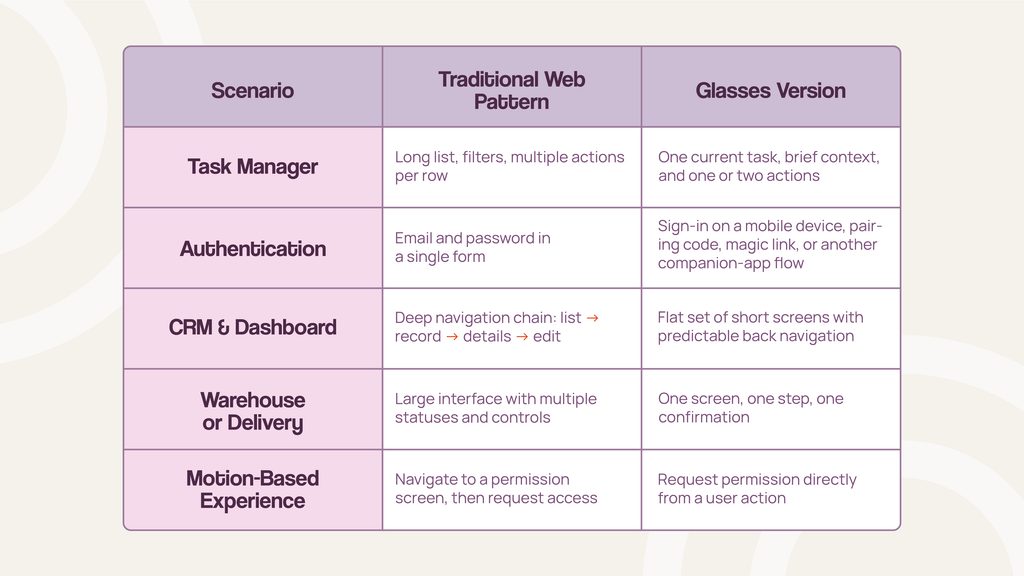
A traditional task manager with scrolling lists and multiple actions per row must be redesigned as a focused workflow with a single task and a few possible actions. Deep CRM or dashboard navigation often needs to be simplified. Password-based authentication becomes less practical than alternative sign-in flows.
At the same time, some use cases benefit from these constraints. Warehouse operations, delivery workflows, field service activities, and step-by-step guidance are often well suited for display glasses because users need fast contextual information rather than complex interfaces.
In these scenarios, the strength of Web Apps is not rich UI complexity but timely access to relevant information.
Conclusion
Web Apps for Meta Ray-Ban Display should not be treated as a smaller version of a traditional website. Although developers continue to use HTML, CSS, and JavaScript, the underlying interaction model is fundamentally different. Pages become screens, cursors become focus states, keyboards become Composer, and the physical world becomes part of the interface itself.
Fortunately, developers do not need physical hardware to begin experimenting with the platform. Meta provides the Meta Ray-Ban Display Web App Simulator for Chrome, which can emulate the display viewport, focus-based navigation model, and several platform-specific validation checks. This makes it possible to validate navigation, layout, and interaction patterns before testing on production devices.
For teams evaluating the platform, theory alone is rarely enough. You can also explore and test interaction patterns in our demo application for Meta Ray-Ban Display, either directly on compatible glasses or through the Meta Ray-Ban Display Web App Simulator:
This provides a practical way to experience focus-based navigation, display constraints, and interface behavior before starting product development.
The platform’s constraints should be considered from the earliest stages of product discovery and design. When an experience can be delivered through a small number of screens, simple navigation, and minimal text input, Web Apps provide a compelling way to build for display glasses. When camera access, audio, complex workflows, or deep mobile integration are required, Wearables Device Access Toolkit is likely the better choice.